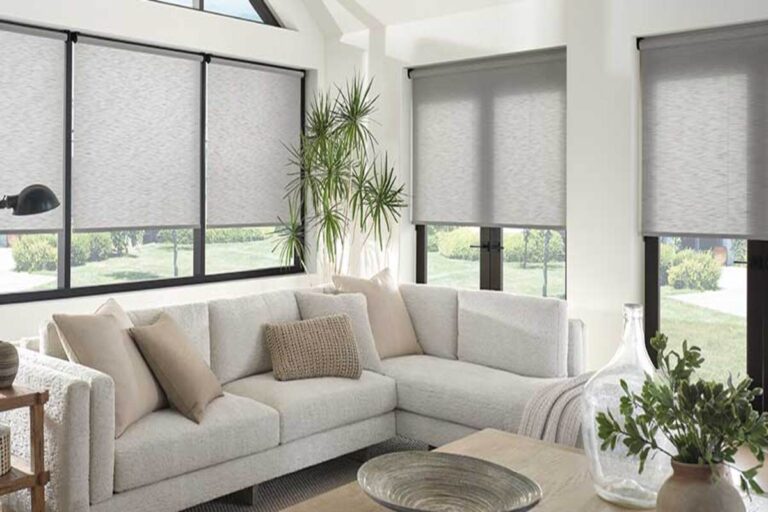

Kill the glare on your monitor and clean up what sits behind you on camera.
Most people did not plan their home office. They put a desk in the spare bedroom, or the bonus room, or the corner of the dining room, and then discovered the window was in exactly the wrong place. Good home office window treatments fix that after the fact. We have worked on a lot of these rooms since everyone started working from home, and the complaints are remarkably consistent: glare washing out the monitor, and a wide-open window behind you on every video call showing your yard, your neighbor’s yard, and whatever is happening in it.
Both problems are fixable. Neither one requires you to give up the window.
Your Home Office Window Is Causing Two Separate Problems
They feel like one problem. They are not, and they get solved differently.
Problem one is the light hitting your screen. Direct sun across a monitor washes out the display. You end up leaning, squinting, and cranking the brightness. This happens whether or not anyone is on a call with you.
Problem two is the light and the view behind you. When a bright window sits behind your head, your webcam meters for the window and puts your face in shadow. You show up as a silhouette. And on top of that, everyone on the call can see straight into your backyard.
The first problem is about light angle. The second is about what the camera sees. A treatment that solves one does not automatically solve the other, which is why the answer usually depends on where you are sitting.
Start With Where Your Desk Sits
This is the first thing we ask about on a home office consultation, and it changes the recommendation more than style preference does.
| Desk position | What goes wrong | What we usually specify |
|---|---|---|
| Window behind you | Backlit on camera, face in shadow, yard on display | Room-darkening roller shade you can drop for calls |
| Window in front of you | Sun straight in your eyes, screen reflections | Solar screen shade or tilting shutters |
| Window beside you | Glare streak across the monitor at certain hours | Shutters or blinds tilted to redirect light up |
| Two exposures | Problem moves through the day | Motorization with a schedule |
If you are not sure which one you have, open your webcam preview at 10 in the morning and again at 3 in the afternoon. That usually settles it.
Best Blinds for Home Office Windows When You Want Tilt Control
Slats and louvers do something fabric cannot. They aim the light instead of just blocking it.
Shutters are one of our favorite answers for an office. You can close them so nobody sees through the window behind you, then tilt the louvers so ambient light still comes into the room. Tilted upward, the louvers redirect sunlight onto the ceiling, and it bounces back down soft and even, with none of it landing on your screen. The room stays bright, the glare goes away, and your background reads as a clean architectural element on camera rather than a bright hole in the wall.
We carry the full plantation shutter lineup, including Heritance Hardwood, NewStyle Hybrid, and Palm Beach PolySatin.
Wood and alternative wood blinds work on the same principle at a different price point. Parkland Wood Blinds add warmth to an office with bookshelves. Everwood Alternative Wood holds up better in a room that bakes in afternoon sun, since it will not warp or fade the way real wood can. Browse all our horizontal and vertical blinds to compare.
The reason the best blinds for home office windows tend to be tilting products is simple: the sun moves. A blind lets you respond to a 9 a.m. problem and a 4 p.m. problem with the same treatment.
Home Office Window Shades for Glare Control and Camera Privacy
Fabric is the other half of the conversation, and this is where most of our home office projects land.
Roller shades are the workhorse. A Designer Roller Shade in a room-darkening fabric gives you the whole range. Leave it up, and you keep the view, which is half the point of working from home. Hop on a call, and you lower it. Glare gone, background clean, nothing behind you but fabric.
Solar screen shades keep the view during the workday. Designer Screen Shades are woven rather than solid, and for a room with a monitor in it we point people toward the tighter weaves. One thing that surprises people: a darker fabric gives you a clearer view out than a white one at the same openness, because it absorbs light instead of bouncing it back at you. More on that in our guide to reducing glare with the right window treatments.
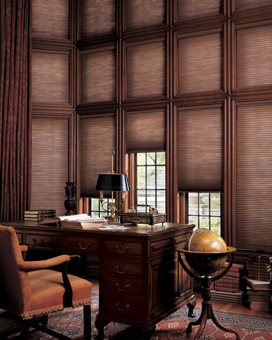
Honeycomb shades do double duty. Duette Honeycomb Shades soften daylight and trap air at the glass, which matters if your office is over the garage or in a bonus room that never holds temperature. See our energy-efficient window treatments if comfort and utility bills are both on the list.
Two configurations worth knowing about:
- Top down bottom up: cover the bottom of the window so the camera and the street both lose the sightline, while daylight still pours in above your head.
- Dual shades: a solar screen and a room-darkening shade on one headrail. Screen during the workday, full block for a presentation or a late call.
If your office doubles as a recording space or you need the light gone entirely, look at room-darkening shades and 100% blackout solutions.
What Actually Reads Well on Camera
A few things we have learned watching clients test their own setups:
- Solid neutrals beat patterns. Cream, greige, soft gray, and warm white read clean. Busy patterns turn to noise under video compression and pull focus off your face.
- Do not put a sheer directly behind you. Sheers are beautiful in a living room. Behind your head on a call, they backlight you, and you become a shadow.
- Texture photographs better than flat white. A woven or linen-look fabric gives the frame a little depth without becoming a distraction.
- Match the room, not just the window. The office is on camera now. It is worth treating it like a room people see rather than a spare bedroom with a desk in it.
Motorized Home Office Window Coverings You Adjust Without Standing Up
This is the upgrade nobody asks for, and everybody keeps.
The best window treatment does nothing if you do not adjust it, and mid-call is exactly when you will not get up. Motorized home office window coverings solve the behavior problem. You are at your desk, the sun swings around, and you pick up a remote or tap your phone and the shade moves. No standing up, no reaching behind the monitor, no interrupting the meeting.
We install Hunter Douglas PowerView Motorization, and it also connects to whatever smart home system you already run. See our full range of motorized blinds and smart shade systems. If your office has floor-to-ceiling windows, motorization stops being a luxury and starts being the only practical option.
Automated Schedules That Follow Your Workday, Not the Clock
If you work from home regularly, you already know your light. You know the sun comes in hard from the east before your first meeting and clears the roofline by mid-morning. We build the schedule around that.
Say your office faces east and you start early. The shade drops at sunrise, blocks the low sun while you work, and raises on its own once the sun passes over the house. You never touch it.
What makes this hold up is that the schedules do not run on fixed clock times. We set them relative to sunrise and sunset, so a shade might raise ninety minutes after sunrise rather than at 7:15. Sunrise in Kansas City moves more than two hours between June and December, so a fixed time is wrong half the year. This one is right every day, and it follows your workday instead of the clock.
Why Kansas City Homeowners Choose Us for Home Office Window Treatments
- We diagnose the room before we sell you anything. Which window, which hour, what you were doing when it bothered you, and where the camera sits. That conversation changes the answer more than any style preference.
- We look at your actual video call. We will have you pull up your webcam preview during the consultation. It is the fastest way to see what is really happening behind you.
- We carry the complete Hunter Douglas and Alta by Hunter Douglas lineup. If one window needs a tight-weave screen and the next needs a tilting shutter, we can specify both, and they will still look intentional in the same room.
- We program the automation before we leave. Motorized shades that nobody knows how to schedule are just expensive manual shades. Our installers set up the app, build your scenes, and walk you through it.
- Three showrooms and our own install crew. Overland Park, Shawnee, and Lee’s Summit, plus shop-at-home service throughout Kansas City North. Our installers are our people, not a rotating subcontracted crew.
- Family-owned since 1995, with more than 1,500 Google reviews at 4.9 stars. A lot of those are second- and third-time customers.
How the Process Works
1. Free in-home consultation.
We come to you and read the light in the room. Compass direction, overhangs, where the desk faces, where the monitor sits, and what time of day it actually bothers you. Then you see real samples in the window they are meant for, in your light. Book a consultation or call the showroom nearest you.
2. Measure and quote.
We measure every opening ourselves and give you a detailed quote before anything gets ordered. In an office, the tolerances matter, since a light gap at the edge of a shade lands right where your screen is.
3. Professional installation.
Our installers handle mounting, motorization, and any programming your setup needs.
4. Final walkthrough.
Before we leave, we set your scenes and schedules, connect anything that needs connecting to your smart home, and make sure you can run all of it without calling us. If something needs attention in year three, we service what we sell.
Home Office Window Treatment Questions We Hear Around Kansas City
What are the best blinds for a home office?
Shutters and tilting wood or alternative wood blinds are usually the strongest choice, because you can redirect sunlight up toward the ceiling instead of just blocking it. That kills screen glare while the room stays bright. If you care more about a clean look on camera, a room-darkening roller shade is the better call.
How do I stop glare on my computer screen from the window?
Cut the direct light without darkening the whole room. A tight-weave solar screen shade or a light filtering roller shade handles most cases, and tilting blinds work well when the sun angle shifts through the day. Repositioning your monitor perpendicular to the window rather than facing it helps more than people expect.
What window treatments look best on video calls?
Solid, neutral fabrics in cream, gray, or soft white read cleanest on camera. Avoid busy patterns, which get noisy under video compression, and avoid sheers directly behind you, since they backlight you into a silhouette. Shutters also photograph well because the louver lines look architectural rather than distracting.
How much do home office window treatments cost in Kansas City?
For a typical office window, most projects land in the range of a few hundred dollars per window, with size, fabric, and motorization driving the difference. Motorized treatments cost more upfront but are the ones clients tell us they would buy again. We break the numbers down further in our guide to blind costs per window in Kansas City.
Are motorized shades worth it for a home office?
For most people who take calls, yes. The value is not the novelty; it is that you will actually adjust the shade when you would otherwise leave it alone and squint. Scheduling is the real payoff, since the shades handle the sun without you thinking about it.
Which window direction causes the most trouble for a home office?
West-facing offices are the worst in the late afternoon, right when most people have their last meetings. East-facing offices are the problem if you start early. South windows get worse in winter here, because the low sun angle drives light much deeper into the room.
Can I keep my view and still cut the glare?
Yes, and that is usually the goal in a home office. A woven solar screen keeps you looking outside while it scatters the direct sun that would otherwise land on your monitor. Darker screen fabrics give you the clearest view out.
Do I need blackout shades in my home office?
Only if the room doubles as something else, like a recording space, a guest room, or a media room. For normal desk work, room darkening is enough and keeps the space from feeling like a cave. If you do need total darkness, side channels are what stop the light leaking around the edges.
How long does it take to get custom shades made?
Lead times vary by product and fabric, and motorized treatments generally take a little longer than manual ones. We give you a realistic timeline at the quote stage rather than an optimistic one. Rush situations are worth asking about, since some product lines move faster than others.
Let’s Fix It Before Your Next Call
If there is a meeting on your calendar where you already know you will be squinting, or you have started angling your laptop away from the window, that is a solvable problem. Bring us the room, and we will bring the samples.
Call the showroom nearest you or schedule a free in-home consultation today, and our designers will help you choose home office window treatments that handle the glare, the camera, and the sun that moves across your desk all day.
Overland Park 913.378.0888 | Shawnee 913.631.0088 | Lee’s Summit 816.347.0885 | Kansas City North 816.468.4433